Shoddy · Fettler
A fettler kept a mill’s machines clean and in working order. This one keeps your files in order for an AI assistant and for scripts. One program, two front ends, and no shell between it and the file.
Fettler gives an AI assistant, and any script, a set of file tools. It can find a file, search it, read it, edit it, move it, copy it and delete it. Fettler does its work in three parts, called levels. Most of this page describes the first level, the tools, which are always on. The last two sections describe the optional levels: guardrails and screenings.
Fettler is written in C# and installs as one file. It does not change how you work, because your shell, your file explorer, your editor and your source control stay as they were.
fettle. The command is the verb form, because fettle move a.txt b.txt reads as an instruction and fettler move does not. Both spellings are correct.Note This page asks you to type nothing. To have Fettler working in about five minutes, go to the quick start.
Renaming a C# type in this repository touches 200 places across 23 files. We measured that number with fettle search. Nobody makes this change by hand, so it is a common job to give an assistant.
| Built-in file tools | Fettler | |
|---|---|---|
| Calls | one search, then a read and an edit for each file: 47 | search, replace --dry-run, replace: 3 |
| Context spent | 23 whole files | the matching lines |
| If it fails at file 15 | 14 files renamed and 9 not. The code no longer compiles, and nothing says which half changed. | Nothing is written until all 23 files are checked. If a write then fails, the answer names the file it stopped at and how many were done. |
| Per-file properties | whatever the tool happened to write | each file keeps its own encoding, line endings and execute bit |
The home page sets each verb beside the tool it replaces, with what used to go wrong. This page is the short form.
| Property | What it means |
|---|---|
| Batches are all or nothing | Fettler checks every edit in a batch before it changes a byte. If one edit cannot apply, none do, and the files stay as they were. |
| Every answer is the next call’s argument | search returns the file, line and column. read numbers its lines and returns a hash, a short code worked out from the file’s content. edit takes the hash back. If the file changed in between, the edit is refused and nothing is written. |
| Answers have a fixed size limit | A read stops at 2,000 lines and at 40,000 characters a call. The answer says how much it left out. A large file cannot fill the model’s context by accident. |
| It reads more than source | Notebooks as cells, spreadsheets as rows with their formulas, Word documents as paragraphs, PDFs as text per page, images as facts. It reads inside archives without unpacking them. |
| It skips generated folders | Find and search leave out bin, obj, .git, artifacts and node_modules unless you ask for them. |
| It finds the client’s own folders | Fettler opens the assistant’s scratch folder, its tool-results folder and its memory folder by itself. You declare nothing. |
| It refuses some writes | A write that would add a password or access key to a file is refused. So is a write to a file that says what Fettler or the assistant may do, such as .fettler.json. |
| Two front ends, one core | A command line for scripts and an MCP server for an assistant. MCP, the Model Context Protocol, is how an assistant starts a tool and talks to it. |
The tools page covers each of these in full.
The tools need no setup file. The other two levels each turn on when the project’s .fettler.json file has a section with that level’s name.
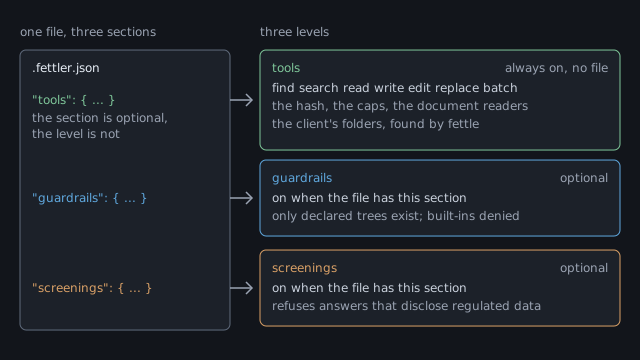
tools section only adjusts settings, and the tools level is on with no file at all.| Level | On when | What it adds |
|---|---|---|
| tools | always. No file is needed | the file tools, the batch, the hash, the size limits, the readers, and the client’s folders |
| guardrails | the file has a guardrails section | folders you declare, with permissions, tasks, and the client’s own file tools turned off |
| screenings | the file has a screenings section | a check that refuses to show regulated data to the model |
Guardrails limit what the assistant can reach. With them on, every path must sit inside a tree, a folder you named ahead of time. Each tree says what may be done in it, such as read only. A setup command also turns off the assistant’s built-in file tools and shell, so Fettler is the only way to the files. The guardrails page sets them up.
A screening stops regulated data from reaching the model. Health records and customer records are examples. You name the trees to screen, and Fettler checks each answer before it leaves. One match refuses the whole answer, with exit code 13. The shared screen is introduced on the home page, and the screenings page turns it on.
PATH, each client’s registration, and the machine file. Shoddy · Fettler