Shoddy · Picker
The second level. You name the databases, and the picker grades what is in them: which tables answer, which verbs they allow, and which columns are not there at all.
This page describes the guardrails level. It is off until .picker.json has a guardrails section. With it off, pick opens every database the login can reach, as Tools shows. With it on, only the databases you declare exist, and a scope can narrow what a table allows or hide some of its columns.
Guardrails add to the tools level. They do not replace it. The query gate, the caps and the five verbs stay the same, and the tools section still holds each server and its connection.
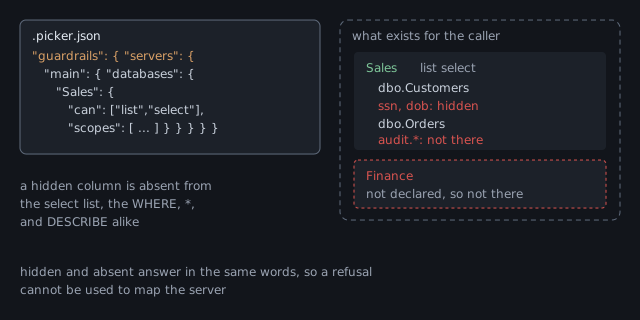
Add a guardrails section beside tools, listing the databases on each server. Here is one database with two scopes, beside the answer pick catalogs gives for it.
{
  "tools": {
    "servers": {
      "main": { "connect": "env:MAIN_SQL" }
    }
  },
  "guardrails": {
    "servers": {
      "main": {
        "databases": {
          "Sales": {
            "can": ["list", "select", "describe"],
            "scopes": [
              { "object": "dbo.Customers",
                "can": ["list", "select"],
                "columns": ["-ssn", "-dob"] },
              { "object": "audit.*", "can": [] }
            ]
          }
        }
      }
    }
  }
}levels
tools on, always; settings from C:\github\app\.picker.json
guardrails on, from C:\github\app\.picker.json
screenings off
main (connect: env:MAIN_SQL)
Sales: list select describe
dbo.Customers: list select columns: -dob -ssn
audit.*: nothing
source: C:\github\app\.picker.jsonguardrails line now says on, and names the file that turned it on.Sales, because Sales is now the only database there is.nothing means the scope allows no verb at all.Three rules about where things go:
guardrails must also be under tools. Otherwise the file is refused, and the message says to declare the server under tools with its connect.connect under guardrails is refused, because a connection belongs to the tools level.A database the file does not declare does not exist. pick does not say that it is hidden, and answers in the same words as for a table that was never there.
$ pick select "SELECT * FROM Finance.dbo.Ledger"
pick: there is no table or view called 'Finance.dbo.Ledger' in the declared databases. Run objects to list what is here (Finance.dbo.Ledger)
$ pick select "SELECT * FROM Sales.dbo.NoSuchTable"
pick: there is no table or view called 'Sales.dbo.NoSuchTable' in the declared databases. Run objects to list what is here (Sales.dbo.NoSuchTable)
The two refusals match on purpose. If they differed, a caller could map the server by reading refusals. This rule is called hidden is absent, and it holds for databases, tables and columns alike.
Customers is looked for in the declared databases only. The connection's own database is never asked..picker.json, using --config PATH.can lists the verbs a database allows. There are three grant words, and each one lets a caller do one thing with a table.
| Word | Lets a caller |
|---|---|
list | see the table in objects, and learn that it exists |
select | read its rows with select |
describe | read its columns, indexes and keys with describe |
list, a table is absent. It is missing from objects, and a query that names it is refused as not there, with exit code 3.select, a table is refused plainly, with exit code 8. The refusal names what the table does allow, because the listing already showed that it exists."selct" would take a verb away without anyone noticing.A scope sets the rules for some of the tables in a database. It names an object pattern, schema.object, where * stands for a whole part. For example, audit.* matches every table in the audit schema.
A scope replaces the database's rules for the tables it matches, and does not add to them. An exact table name beats a whole schema. A table that matches no scope gets the database's own can.
can. A scope with no can is refused, because silence could mean either "allow nothing" or "allow what the database allows"."can": [] hides the tables it matches. That is how audit.* above seals a whole schema.screenings, keyed by the database and the scope's pattern, as Screenings shows.columns on a scope decides which columns exist for the caller. There are three ways to write it, and one that is refused.
| You write | The caller sees |
|---|---|
"columns": true, or nothing | every column |
"columns": ["name", "city"] | only those columns |
"columns": ["-ssn", "-dob"] | every column except those |
"columns": ["name", "-ssn"] | refused when the file is read. One list cannot both include and exclude |
A hidden column does not exist anywhere. It is refused in the select list, in WHERE, ON, GROUP BY and ORDER BY, and inside expressions. A filter such as WHERE ssn = … would let a caller guess a column one row at a time, so it is refused too.
$ pick select "SELECT name FROM Sales.dbo.Customers WHERE ssn = '123-45-6789'"
pick: 'ssn' is not a column of Sales.dbo.Customers. Run describe to see its columns (ssn)SELECT * is not a way round it. The star becomes the allowed columns before the server sees the query, and the answer shows the list it chose.describe leaves hidden columns out. An index or key that uses a hidden column is left out whole, because a note saying "one column not shown" would tell the caller the column exists.servers and databases are both plural. A staging database beside a warehouse, and a second server beside the first, fit in one file like this.
{
  "tools": {
    "servers": {
      "warehouse": { "connect": "env:WAREHOUSE_SQL" },
      "ops":       { "connect": "env:OPS_SQL" }
    }
  },
  "guardrails": {
    "servers": {
      "warehouse": {
        "databases": {
          "Staging": { "can": ["list", "select", "describe"] },
          "Sales":   { "can": ["list", "select", "describe"] }
        }
      },
      "ops": {
        "databases": {
          "Orders": { "can": ["list", "describe"] }
        }
      }
    }
  }
}SELECT … FROM Staging.load.Batch b JOIN Sales.dbo.Orders o ON … is one statement on one connection. Each table keeps its own scope and column rule.connect, and should have its own narrow login. The next two sections cover both..picker.local.json sits beside .picker.json, and you keep it out of source control. It holds the facts that belong to one machine: connection strings, and where the screening models are. It may hold those two things and nothing else.
{
  "tools": {
    "servers": {
      "main": {
        "connect": "Server=db.internal;Integrated Security=true;TrustServerCertificate=true"
      }
    }
  },
  "screenings": { "models": "C:/models/screening" }
}tools.servers.NAME.connect and screenings.models. Anything else in it refuses the load.guardrails section, a databases entry or a screen. Each would be a rule that nobody reviewed.connect, the local one wins. Pick one place per server, so that the next reader is not left guessing.Whoever can write these two files decides what pick allows. The next call obeys any edit, because pick reads them every time. pick itself cannot write them, because it has no write verb, but another tool the assistant holds probably can.
.picker.json and .picker.local.json, just as it refuses to write its own configuration.Set-ItemProperty .picker.json, .picker.local.json -Name IsReadOnly -Value $truechmod a-w .picker.json .picker.local.jsonNote Read-only slows a tool down. It does not stop one. A tool that can run a shell can clear the setting with one command, so denying the shell is the stronger protection.
Connect as a login granted only SELECT and VIEW DEFINITION on the declared databases. pick enforces its rules inside pick, but the server has rules of its own, and the two should agree. Then even a fault in pick has nothing wider to use.
Declaring a database grants the login nothing. If the login cannot enter a declared database, the server says so, and pick reports that as denied, exit code 9, meaning the server declined. It never reports it as refused, which means pick declined, so nobody debugs a boundary that is working.
Integrated Security=true), where the connection arrives as a Windows or Entra account with no password anywhere. Grant the same two rights to that account, to a group, or to a role the account belongs to. Only the name in the T-SQL changes.An administrator runs the grant once, and it is all that pick's login can ever do. With a SQL login of its own, it looks like this:
CREATE LOGIN pick_reader WITH PASSWORD = 'a-strong-generated-password';
USE Sales;
CREATE USER pick_reader FOR LOGIN pick_reader;
GRANT SELECT          TO pick_reader;   -- the rows
GRANT VIEW DEFINITION TO pick_reader;   -- the metadata describe reads
With integrated security, the same two grants go to the account or its group. Or they go to a role, so that membership is the only thing that ever changes:
CREATE LOGIN [DOMAIN\report-readers] FROM WINDOWS;  -- a group: membership stays AD's job
USE Sales;
CREATE USER [DOMAIN\report-readers] FOR LOGIN [DOMAIN\report-readers];
CREATE ROLE pick_reading;
GRANT SELECT, VIEW DEFINITION TO pick_reading;
ALTER ROLE pick_reading ADD MEMBER [DOMAIN\report-readers];
On a development machine with LocalDB, integrated security covers all of this, because the instance is yours alone. On a shared server, the grants are the whole task. A SQL login's password goes in the local file or an environment variable, never in the checked-in file.
$ pick doctor
pick X.Y.Z
  ok tools: on, always; settings from C:\github\app\.picker.json
  ok guardrails: on, from C:\github\app\.picker.json
  ok screenings: off
  ok configuration: C:\github\app\.picker.json
  ok server main: connects (1 database(s) declared)
doctor never prints a connection string. It says whether the server answered, not how pick reached it. Then run pick catalogs to see what is declared, and pick objects to see what a caller may list.
Prove it. Do not trust it. A correct file and a boundary that holds are two different claims, and only the second one matters. Try each of these yourself, or ask the assistant to, and check what comes back.
| Try to… | A correct setup… |
|---|---|
| select from a database the file does not declare | refuses with exit 3, in the words for a table that never existed, whether or not the database is real |
select from a table whose scope is "can": [] | refuses with exit 3, and objects never listed it |
select from a table that allows list but not select | refuses with exit 8, naming what the table does allow |
select a column the scope hides, then filter on it with WHERE | refuses both with exit 3, in the words for a column that does not exist |
SELECT * from that same table | returns every column except the hidden ones, and names the columns it chose |
run DELETE, EXEC, or a second statement | refuses with exit 8, each with its own reason |
read sys.tables, or call OBJECT_DEFINITION() | refuses with exit 8. The catalog answers through describe, under the scopes |
| describe a view | gives its columns and never its stored text |
connect with the login and a plain SQL client, and try an INSERT | the server refuses. The login's grant stops at SELECT |
edit .picker.json, then call again without restarting | the change applies, because pick reads the file before every call |
If a screen is declared, add the screening checks, which Prove it refuses lists.
No command made this picture. Every line of it was written by hand into .picker.json and its local twin, and pick refuses to write either file.

| On the map | What says so |
|---|---|
Sales lit, and nothing else | the one entry under databases. Whatever is not declared stays dark |
audit.* sealed, never listed | "can": [] on its scope. A scope replaces what the database allows, so an empty one allows nothing |
ssn and dob missing from Customers | "columns": ["-ssn", "-dob"]. They are taken out of SELECT * before the server sees the query, and refused anywhere else |
| the view's text never answering | no line, and no line could. View text names the tables under it, which may be what a scope hides |
| the login's short reach | not pick's file at all. A person grants it on the server, as the login shows |
| the one way in | the connect under tools, and the gate in front of it, which no line turns off |

USE, no sys.* and no linked server. The reference holds every refusal.SELECT and VIEW DEFINITION, so the server keeps a boundary of its own. Shoddy · Fettler