Shoddy · Picker
The first of three levels. A server, its connection, and the gate every query passes through. The picker takes what the login can reach and changes none of it.
This page describes the tools level, which is always on and which no setting turns off. All it needs is a .picker.json that names a server and says how to connect to it. With nothing more in the file, you get every database the login can reach, and every query goes through the same gate.
pick does three kinds of work, called levels. Each level is a section of .picker.json with the same name, and you add the second and third only when a project needs them.
| Level | On when | What it adds |
|---|---|---|
| tools | always | a connection, the five verbs, the query gate and the caps. This page |
| guardrails | the file has a guardrails section | the databases you declare, the verbs each allows, scopes and hidden columns. Guardrails |
| screenings | the file has a screenings section | a check on every answer for regulated data, such as a social security number. Screenings |
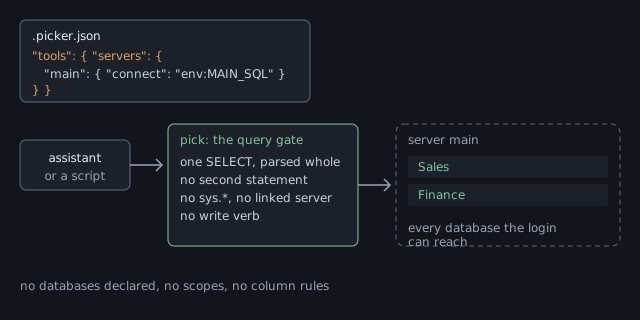
A tools-only file is a connection and nothing else. It names each server under tools and gives each one a connect, which says how to reach the server. Here is the smallest useful file, beside the answer pick catalogs gives for it.
{
  "tools": {
    "servers": {
      "main": {
        "connect": "env:MAIN_SQL"
      }
    }
  }
}levels
tools on, always; settings from C:\github\app\.picker.json
guardrails off
screenings off
main (connect: env:MAIN_SQL)
every database this login can reach; guardrails are off, so none is declared
source: C:\github\app\.picker.jsonlevels block comes first, with one line per level. Each line says whether that level is on and which file turned it on.(local file), and never the string itself.catalogs opens no connection, so it cannot name the databases. Run pick objects to see the tables and views inside them.The best place for the connection string is an environment variable. "connect": "env:MAIN_SQL" tells pick to read the string from the variable MAIN_SQL when a call needs it, so nothing secret sits in any file. Set the variable before you start pick, or before you start the assistant that runs it.
$env:MAIN_SQL = "Server=localhost;Integrated Security=true;TrustServerCertificate=true"
pick catalogsexport MAIN_SQL="Server=localhost;User ID=pick_reader;Password=...;TrustServerCertificate=true"
pick catalogs.picker.local.json sits beside .picker.json, and you keep it out of source control. The local file explains what it may hold.connect anywhere also refuses the file, and the message names the server so you know which one to fix.Every online database the login can enter is there. The login is the account pick connects as. pick asks the server for this list each time a call needs it, so a database made a minute ago shows up on the next call.
The list leaves out the four system databases: master, tempdb, model and msdb. They hold the server's own state, not anybody's data. If you need one, declare it under guardrails.
Each database on the list allows all three grant words: list, select and describe. list lets objects show a table, select lets a query read its rows, and describe lets a caller read its columns and keys.
The login decides how long the list is. A login that can enter two databases gives a list of two, which is one reason to connect as a login with only the rights pick needs. The login shows the grants.
The query gate reads every statement before it reaches the server. It is the same at every level, because guardrails do not change it and no setting turns it off.
The gate first parses the statement. To parse is to break the text into its parts, such as the tables it names and the columns it asks for. The gate then checks each part against a list of parts it knows. If any part is not on that list, the gate refuses the whole statement.
| The gate refuses | Because |
|---|---|
| a second statement in the same call | one call carries one SELECT, parsed whole |
a write: INSERT, UPDATE, DELETE, MERGE, EXEC, or SELECT … INTO | pick has no write verb. It reads, and that is all |
sys.*, INFORMATION_SCHEMA, and OBJECT_DEFINITION | these are the server's own catalog. describe answers the same questions |
| a four-part name, which reaches a linked server | a linked server is a second server reached through the first |
| anything the gate does not know | it fails closed. An unknown part is refused, never passed |
What passes is rewritten before it runs. Every table name becomes its full three-part name, Database.schema.object. SELECT * becomes the list of columns, and the answer shows that list. The reference lists every refusal.
There is no default database. pick never asks the connection which database it is in, and looks for every name in the databases on the list instead.
Sales.dbo.Customers, names one database. If that database is not on the list, the answer is the same as for a table that does not exist.Customers, is looked for in every database on the list.$ pick select "SELECT TOP 5 * FROM Customers"
pick: 'Customers' is in more than one place: Archive.dbo.Customers, Sales.dbo.Customers. Qualify it (Customers)
$ pick select "SELECT TOP 5 * FROM Sales.dbo.Customers"How a name resolves has the full rules.
Every answer has a size limit, and the answer says when it hit one. The limits keep one answer from filling the assistant's context, which is the text it can hold at once.
| Cap | Limit | When it is reached |
|---|---|---|
rows from select | 100. --limit N changes it | the answer says it was cut and how to narrow the query |
| characters in one cell | 2,000 | the cell is cut, and says how long it was |
| characters in one answer | 40,000 | no more rows are added, and the answer says it was cut |
| time for one query | 30 seconds | the query is stopped, with exit code 10, timed-out |
objects from objects | 500 | the list ends with (truncated) |
The verbs are the same on the command line and through the MCP server, which is the part of pick an assistant talks to. Its answer to a verb is the same as the answer to pick VERB --json.
| Verb | What it answers |
|---|---|
catalogs | the levels, then each server and what it allows. It opens no connection, so it works while a server is down |
objects | the tables and views you may see, with their column counts and grants |
select | the rows of one SELECT, after the gate approves it |
describe | one table or view: its columns, types, indexes and foreign keys |
doctor | the levels, whether the file loads, and whether each server answers. It never prints a connection string |
describe reads the server's catalog and never runs the object. For each column it gives the type and whether the column may be empty (null), and then it lists the indexes and foreign keys.
$ pick describe Sales.dbo.Orders
Sales.dbo.Orders  (table)
  OrderId  int not null
  CustomerId  int not null
  PlacedOn  date not null
  index PK_Orders (primary key): OrderId
  fk FK_Orders_Customers: CustomerId -> Sales.dbo.Customers (CustomerId)
hash: 6f1c...DESCRIBE, in detail is in the reference.
Run pick doctor after you write the file. It opens with the three level lines, then knocks on each server, which means it opens a connection and closes it again.
$ pick doctor
pick X.Y.Z
  ok tools: on, always; settings from C:\github\app\.picker.json
  ok guardrails: off
  ok screenings: off
  ok configuration: C:\github\app\.picker.json
  ok server main: connects (guardrails off: every database the login can reach)
A level that is off is one line, and its checks do not run. The MCP server tells the assistant the same thing, because its opening note says which levels are on for that launch.
To give an assistant these verbs, register pick with it. pick has no setup command, so registering it is one entry you write by hand, as Installing It shows.
The older shape, with servers or models at the top, is refused. The message holds your own entries, rewritten under the three sections, so to fix the file you paste that part of the message over it.
pick: .picker.json has "servers" at the top, which is the shape this version no longer
reads. Rewrite it with three sections, one per level. Your entries, rewritten:
{"tools":{"servers":{"main":{"connect":"env:MAIN_SQL"}}},"guardrails":{"servers":{...}}}tools, guardrails and screenings.tools section takes servers, and each server takes connect. A databases entry under tools is refused. The message shows where it goes under guardrails.When every reachable database is too many, turn on guardrails. The next page shows how to declare the databases you want and hide the rest.
 Shoddy · Fettler