
scribbler is Shoddy's drawing surface: a rectangle of pixels
shown in a window. You open one with ScribblerOpen(width, height)
and get back a handle, a value that stands for the window. Think of the
surface as a sheet of graph paper pinned to the wall: one little square per
pixel, each square able to hold a colour. This machine is the friendly layer
on top. The window and the raw
"set this one pixel" operation come from a handful of built-in
words (ScribblerPixel, ScribblerGetPixel,
ScribblerWait, and friends). Everything you would want to
draw with (lines, rectangles, circles, polygons, a flood fill),
plus a tidy way to read keyboard and mouse events and to keep a steady frame
rate, is written here, in ordinary Shoddy, on top of that one pixel word.
Every drawing word takes the scribbler and hands it back. So a run of
drawing calls reads like a chain even though, underneath, they are all
scribbling into the same shared buffer.
For a long time, a computer "display" was not a grid of dots at all. The earliest screens were vector displays, closer to an oscilloscope than a television: they steered a beam directly from point to point to draw lines. Beside them sat character terminals, which could only show letters in fixed cells. Neither could show an arbitrary picture, because there was nowhere to keep one: no memory that said, dot by dot, what the whole screen should look like.
The idea that changed everything was the framebuffer: set aside a block of memory with one entry per screen dot, and let display hardware scan through that memory many times a second, painting each dot the colour it finds there. Each dot is a pixel, short for "picture element". The scanning pattern, a beam sweeping left-to-right and top-to-bottom, was borrowed straight from television. It had long been called a raster, from the Latin for a rake: those neat parallel lines. Now a picture was just data: to change the screen you changed memory, and any shape you could compute, you could show. Through the early 1970s, as memory grew cheap enough, framebuffers went from a lab curiosity to the foundation of everything. Xerox PARC's Alto (1973) drove a bitmapped screen from ordinary memory. The first paint programs were written against the earliest colour framebuffers around the same time. The line runs unbroken to the device you are reading this on. Its screen is, underneath every window and animation, a framebuffer being scanned out dozens of times a second.
Once a picture is just a grid of pixels, drawing a smooth shape becomes a
small puzzle: which pixels best approximate this line, this circle? The
classic answers are older than the framebuffer itself. Jack Bresenham,
working at IBM in 1962, published a line-drawing algorithm that uses only
integer addition to decide each next pixel: no division, no floating
point. It, and its sibling for circles, is still what graphics hardware
reaches for today. This machine uses exactly those algorithms:
DrawLine is Bresenham's, and DrawCircle is the
midpoint-circle method descended from it. No special hardware, no scan-out
beam, just a buffer of pixels and the same integer arithmetic that
has been drawing lines for sixty years.
Text is wonderful until the moment you want to show something: a
chart, a little game, a picture that a turtle draws as it walks, the output
of some simulation you would rather watch than read. For that you need pixels, a
window to put them in, and a way to hear the keyboard and mouse. Reaching
all the way down to "colour pixel (x, y)" for every last dot is
exhausting; nobody wants to plot a circle one pixel at a time by hand.
scribbler gives you the shapes you actually think in: draw a
line from here to there, outline a rectangle, fill a circle, pour paint into
a region. It also gives you a clean stream of events (little records
of what just happened), so your program can respond to a click or a
key press. Reach for it whenever a program has something visual to say: a
toy, a visualiser, a sketch, or as the canvas underneath
turtle, which does all its drawing into a
scribbler.
The usual shape of a scribbler program is: open a window, draw into it,
show what you drew, and loop reading events until the user quits. Colours
are three numbers: red, green, blue, each 0–255. Coordinates count
from the top-left corner, with y growing downward, the
way screens have always numbered their rows.
Include "scribbler.shoddy"

Def Main()
    Let sc = ScribblerOpen(320, 240)
    Let sc = ScribblerTitle(sc, "hello, pixels")

    Let sc = FillRect(sc, 0, 0, 320, 240, 10, 10, 30)       ' dark blue ground
    Let sc = DrawLine(sc, 20, 20, 300, 220, 255, 255, 0)    ' a yellow diagonal
    Let sc = DrawCircle(sc, 160, 120, 60, 255, 80, 80)      ' a red ring
    Let sc = FloodFill(sc, 160, 120, 40, 40, 90)            ' pour paint inside it
    Let sc = ScribblerBlit(sc)                              ' show it

    Loop(sc)

Def Loop(sc As Scribbler)
    Select Case NextEvent(sc)                               ' blocks at zero CPU
        Case ScribblerQuit()
            ScribblerClose(sc)
        Case ScribblerKeyDown(key, mods, at)
            If key = 27 Then ScribblerClose(sc) Else Loop(sc)   ' Escape quits
        Case Else
            Loop(sc)
A few things worth knowing:
sc each line. It reads like each call produces a
fresh surface, and you can treat it that way. Underneath, though, the pixel
buffer is one shared thing being written in place. The handle you get back is
the handle you passed in.ScribblerBlit is the blit: the copy that pushes the
buffer to the actual window. Draw your whole frame, then blit once.
That is how you avoid flicker.ScribblerSave(sc, path) writes the buffer to a PNG. It consults
no window and does not blit: saving and showing are separate requests, and a
program that wants both says both. Because nothing but the buffer is
involved, it works headless (with no window at all), and it works under
the mill's --no-window flag, which
opens every scribbler hidden. That is the pair to reach for when the output
is a file rather than a session: a chart captured by a build, a screenshot
in a script. ScribblerPlace(sc, x, y) puts the window somewhere
particular on the desktop. It is a request, not a command: window managers
are entitled to place windows where they like, and tiling ones routinely
do.NextEvent blocks at zero CPU until something happens, then
hands you a ScribblerEvent: a mouse click, a key, a typed
character, a timer tick, or a quit. Match on it with
Select Case, as above. PeekEvent is the
non-blocking twin. It returns ScribblerNone when the queue is
empty, so a game loop can drain pending input and get on with
animating.ScribblerKeyDown reports a stable
key code (letters and digits sit on their ASCII values; Enter is 13,
Escape 27, the arrows 262–265, and so on). Good for controls.
ScribblerTyped reports the actual character the user
produced, with keyboard layout, Shift, and IME (the composing input used for
languages like Japanese) already applied. Good for text entry. Do not
try to turn one into the other.SetFps(sc, 30)
asks the window to deliver a ScribblerTick event about thirty
times a second. Every event carries an At timestamp, so
SinceLast(e, prev) gives you the exact time since the last
frame, drift-free. That is the number you multiply speeds by, so motion
looks the same on a fast machine and a slow one.You do not need this section to draw a circle. It is here so that the one error that surprises everyone does not surprise you.
A scribbler needs a real window, and the window backend lives inside the
process only when the program is launched with mill run.
That is the way to run anything that opens a scribbler. The debugger has the
backend too, so pressing F5 on a scribbler program works: you can step
through a game loop while the window stays live. A program woven
with mill weave and then run as dotnet FILE.dll has no
window backend loaded, so ScribblerOpen raises an error there.
This is a limitation of where the window lives, not a bug in your code.
The consolation: everything that only touches the pixel buffer works
headless, with no window at all. All the drawing words below,
ScribblerGetPixel, and ScribblerWidth/ScribblerHeight
operate on the buffer directly. A woven program can still draw into a
scribbler and read pixels back; it cannot open a window to show
them. If you need a picture out of a headless run, draw it and read the
pixels. If you need to see it live, use mill run.
How the shapes are built. Underneath, there is exactly one
primitive: ScribblerPixel(sc, x, y, r, g, b), the built-in that
colours a single dot. Everything else is composed from it in plain Shoddy.
DrawHLine and DrawVLine fold that primitive along a
row or column. DrawLine is Bresenham's integer algorithm,
because horizontal and vertical spans alone cannot do a diagonal.
DrawRect is four spans; FillRect is a stack of
horizontal ones. DrawCircle walks a single octant (one eighth
of the circle) with the midpoint method and mirrors each point into the
other seven; FillCircle draws one horizontal span per row
instead. DrawPolyline and DrawPolygon chain line
segments through a list of Points (the polygon adds the closing
edge).
The flood fill is the interesting one.
FloodFill pours a colour into the connected region of matching
pixels around a starting dot. It is a scanline fill (it
paints whole horizontal runs at a time), driven by an explicit
worklist of seed points. It is deliberately not the textbook
four-way recursion, which would blow the call stack (the memory that tracks
calls in progress) long before it covered a 640×480 region. (Shoddy
turns only a word's tail-calls to itself into a loop; a
mutually-recursive fill would not get that treatment.) It needs no "visited"
set, because it reads and writes the same buffer as it goes. Once a pixel is
painted, it no longer matches the colour being replaced, so the fill
naturally stops at its own edge. One subtlety the code is careful about:
reading a pixel outside the buffer yields black, which would "match" a black
starting colour forever, so every read is bounds-checked first.
A note on names. Every event constructor here is prefixed
Scribbler on purpose. Shoddy folds names to uppercase, and
vt100 already exports its own KeyUp and
KeyDown; the prefix keeps a program that includes both machines
from colliding. The event timestamp field is At, not
Ticks, because a built-in of that name would outrank a record
accessor. Small deliberate choices, the kind that keep the useless
useful. Shoddy by name.
The eighteen Scribbler* words the runtime
dispatches: not defined here, documented here
These are not scribbler's Defs. The engine
dispatches them, and a Def whose name is a builtin is refused.
They are listed on this page because scribbler is the derived
layer over exactly these eighteen, and they need no Include. The
same eighteen are documented in machines/scribbler.shoddy's own
header block.
Coordinates count from 0 and are clamped to the buffer;
colours are 0–255 per channel. Every word leaves exactly one
value. The mutators return the scribbler itself, which is what lets
Let sc = … chains read functionally even though the
buffer is mutated in place. Nothing shows until ScribblerBlit:
a frame is assembled off-screen and arrives at once.
| Word | Description |
|---|---|
| ScribblerOpen(w, h) | Open a window w by
h pixels. Requires the window backend (mill run or
mill dap); woven output run through bare dotnet
aborts here. Everything that only touches the buffer works
headless. |
| ScribblerClose(sc) | Shut the window. |
| ScribblerTitle(sc, s) | Put s in the title
bar. |
| ScribblerWidth(sc) / ScribblerHeight(sc) | The buffer's size in pixels. Both work headless. |
| ScribblerPlace(sc, x, y) | Ask for the window's top-left corner in desktop pixels. A window manager may ignore it, and nothing reads it back. |
| Word | Description |
|---|---|
| ScribblerPixel(sc, x, y, r, g, b) | Set one pixel. The one drawing primitive: every line, rectangle, circle and fill in the reference below is built on it and nothing else. |
| ScribblerGetPixel(sc, x, y) | The colour at x, y as
a 3-element array. Works headless, and is what FloodFill reads to
find its region. |
| ScribblerFill(sc, r, g, b) | Fill the whole buffer with one colour, the usual first call of a frame. |
| ScribblerText(sc, x, y, scale, r, g, b, s) | Draw s
in the built-in 8×8 font, scale times its own size. A scale of 1
is eight pixels tall. |
| ScribblerBlit(sc) | Show what has been drawn. Until this is called the window does not change. |
| ScribblerSave(sc, path) | Write the buffer to a PNG: eight-bit
truecolour, alpha dropped, no window consulted, so it works headless and under
--no-window. |
| Word | Description |
|---|---|
| ScribblerSetInterval(sc, ms) | Ask for tick events every
ms milliseconds; 0 turns them off. SetFps below is
this in the units a frame loop thinks in. |
| ScribblerPoll(sc) | The next pending event as a raw 8-element
array, kind 0 meaning none. Never blocks. DecodeEvent below turns
it into the ScribblerEvent type. A builtin cannot reach a
Type, so the lifting is this machine's job. |
| ScribblerWait(sc) | The same, but blocks until an event arrives, at zero CPU, which is what makes an idle program idle. It aborts headless, since nothing would ever wake it. |
A Scribbler is its own value kind, so unlike a file handle it
cannot be carried by a number. A reckoner seed needs exactly that, since
a resource held in reckoner's named table is found again by an integer the
binding carries. These three exist for that caller. An ordinary program takes
its window from ScribblerOpen and never sees a slot.
| Word | Description |
|---|---|
| TryScribblerOpen(w, h) | ScribblerOpen with both of
its failures reported rather than fatal (no window backend, and a size below
1×1), answering Ok(slot) rather than the window itself. |
| ScribblerOf(n) | The window that slot names. |
| ScribblerShut(n) | Close it and free the slot, answering False for one already let go, so closing twice cannot end a run. |
Every word, plus the ScribblerEvent and Point types
| Word | Description |
|---|---|
| ScribblerEvent | Everything that can happen in the window, as one
sum type (a value that is always exactly one of a fixed set of cases). Its
cases: ScribblerNone (nothing);
ScribblerMouseDown(X, Y, Button, Mods, At) and
ScribblerMouseUp(X, Y, Button, Mods, At);
ScribblerMouseMove(X, Y, Mods, At);
ScribblerKeyDown(Key, Mods, At) and
ScribblerKeyUp(Key, Mods, At) (stable key codes);
ScribblerTyped(Ch, Mods, At) (the character produced);
ScribblerTick(At) (a frame timer); and
ScribblerQuit (the window was closed). Mods is a
bitfield, a number whose binary digits are on/off flags (1 Shift, 2 Ctrl,
4 Alt, 8 Super), and At is the tick
timestamp when the event happened, present on every kind. |
| Point | A simple X, Y pair, used to feed
DrawPolyline and DrawPolygon a list of
vertices. |
| Word | Description |
|---|---|
| NextEvent(sc) | Blocks at zero CPU until something happens, then
gives you the next ScribblerEvent. Never returns
ScribblerNone. The natural heart of an event-driven program. |
| PeekEvent(sc) | The non-blocking twin: returns the next event if
one is waiting, or ScribblerNone if the queue is empty. Use it in
an animation loop that wants to drain input and keep drawing. |
| DecodeEvent(e) | Turns the raw 8-element array from the
ScribblerPoll/ScribblerWait built-ins into a
ScribblerEvent. You will rarely call this directly
(NextEvent and PeekEvent do it for you), but it is here
if you poll the built-ins yourself. |
| Word | Description |
|---|---|
| SetFps(sc, fps) | Asks the window to deliver a
ScribblerTick event about fps times a second: your
animation heartbeat. |
| SinceLast(e, prev) | The time between event e and the
timestamp prev: the frame delta, taken straight from the event's
At field so it never drifts. Multiply your speeds by it for motion
that looks the same on any machine. |
| Word | Description |
|---|---|
| DrawHLine(sc, y, x0, x1, r, g, b) | A horizontal line across row
y, from x0 to x1 (either order), in
colour r,g,b. |
| DrawVLine(sc, x, y0, y1, r, g, b) | A vertical line down column
x, from y0 to y1 (either
order). |
| DrawLine(sc, x0, y0, x1, y1, r, g, b) | A straight line between any two points, at any angle. Bresenham's algorithm, so diagonals come out clean. |
| DrawRect(sc, x, y, w, h, r, g, b) | The outline of a rectangle
whose top-left is (x, y) and whose size is
w×h pixels (a 1×1 rect is a single
pixel). |
| FillRect(sc, x, y, w, h, r, g, b) | A solid rectangle, same
placement and sizing as DrawRect. |
| DrawCircle(sc, cx, cy, radius, r, g, b) | The outline of a circle
centred at (cx, cy): the midpoint-circle method. |
| FillCircle(sc, cx, cy, radius, r, g, b) | A solid disc, centre and radius as above. |
| DrawPolyline(sc, points, r, g, b) | Connects a list of
Points with straight segments: an open path, no closing
edge. |
| DrawPolygon(sc, points, r, g, b) | Same as DrawPolyline
but closes the shape, joining the last point back to the first. |
| Word | Description |
|---|---|
| FloodFill(sc, x, y, r, g, b) | Pours colour r,g,b into
the connected patch of same-coloured pixels around (x, y): the
paint-bucket tool. Stops cleanly at any edge of a different colour, and stays
inside the window. If the starting pixel is already the fill colour, it does
nothing. |
| User | How | |
|---|---|---|
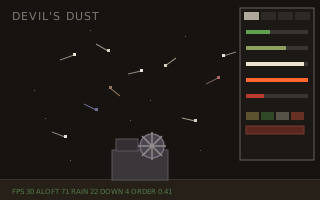 | devils-dust | The
mill interior, the wisp trails, the tuning panel: all draw calls at
30 fps, paced by ScribblerTick. |
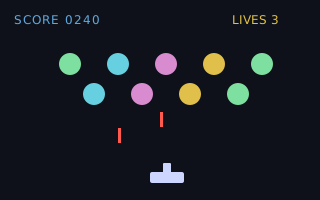 | invaders | The window, the sprites and the event loop of the shell. |
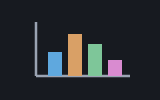 | plotter | Every chart mark lands through the draw words: lines, rects, circles and flood fills. |
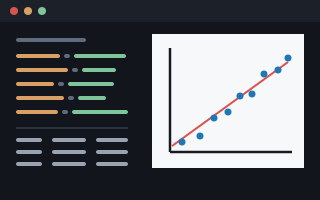 | tally | The chart window: ScribblerTitle and ScribblerPlace, then a NextEvent loop waiting for the picture to be dismissed. |
 | turtle | DrawLine:
every segment the pen leaves behind. |
| Machine | Why | |
|---|---|---|
 | seq | List chores in the
event layer (Last). |
 Shoddy · The Machines