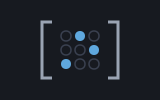
sparse is a grid of numbers for the case where nearly all of
them are zero. That mostly-zero kind of grid is what mathematicians call a
sparse matrix. The matrix machine keeps every cell,
which is the right thing to do when the cells are all carrying something. But
plenty of real grids are mostly empty: a hundred rows and a hundred columns
holding four hundred numbers and nine thousand six hundred zeros.
Storing those zeros means paying for them twice: once in memory, and again
every time an operation walks over them multiplying by nothing. This machine
stores only what is there. A Sparse remembers its size, and then,
column by column, only the row numbers that hold something and the values that
sit in them. A zero is not a stored zero. It is an absence. Reading a cell
nobody filled in gives you 0, because nothing is there to say
otherwise.
Small grid? Use matrix. This machine only wins when the zeros dominate and the grid is big enough for the difference to show. For a 3×3 rotation or a little system of equations, the dense Matrix is faster, shorter to read, and the one everything else in the tree speaks. Sparse is the working form for the big thin problems, which in this tree means linear programming (finding the best mix of numbers under a set of limits) and the machines built on it.
Sparse storage was born of desperation rather than elegance. In the late 1950s and through the 1960s, computers had memories measured in tens of thousands of words. The problems people most wanted to solve (power grids, oil refinery blending, structural frames, national economic plans) had matrices with millions of cells and only a scattering of numbers in them. Storing the whole grid was not slow. It was impossible: the matrix did not fit. So the practitioners of the day stopped storing the grid and started storing a list of what was in it.
What settled out of that, and is still what everyone uses, is the pair of compressed formats: compressed sparse column and its mirror image, compressed sparse row. The idea is exactly the one this machine uses. Take the matrix a column at a time. For each column, write down the row numbers that hold something, in order, and the matching values. That is it. Nothing records where the zeros are, because the zeros are the gaps between what was written down. To find a cell, look in its column and see whether its row number is listed. If it is not, the answer is zero, and you knew that without looking anything up.
The third form worth knowing is the triplet: a plain list
of (row, column, value) records, in no particular order. It is a poor
working format, because finding a column means reading the whole list. But it
is the natural interchange format, the form the data travels in. It
is exactly how a file states a matrix, and exactly what a program has to hand
while it is still discovering the numbers. So the pattern, then and now, is:
gather triplets, then compress them once into columns and work from those.
That is what SpFromEnts does here, and it is why
SpEnt exists as a type of its own.
Why column-major rather than row-major, when matrix chose rows? Because the algorithm that asked for this machine wants columns. The revised simplex method (the classic step-by-step solver for linear programs) prices a linear program by taking one column of the constraint matrix at a time, and solves for a direction using another single column. It never wants a row. Layouts should follow their readers, and this one's reader reads down.
The moment a problem is built out of parts that only touch their
neighbours, its matrix goes mostly empty. A road network's connection grid
has a row and a column for every junction, and each junction meets three or
four others, and the rest of that row is zeros. A blending problem has a column
per ingredient and a row per specification, and any one ingredient affects a
handful of specifications, not all of them. A structural model, a Markov
chain (a process of chance moves from state to state) that only steps to
adjacent states, a page of a spreadsheet where most cells are blank: the same
shape every time. The published
BLEND problem this tree ships is a
good example: 83 variables, 117 normalised constraint rows, and 789 numbers
in a grid with 9,711 cells. Storing it densely means carrying nearly nine
thousand zeros and reading them, over and over, on every pass of the solver.
Reach for sparse when your grid is big and your zeros outnumber
your numbers. Leave it alone when they do not.
There are three ways in. SpFromEnts takes the dimensions and a
list of SpEnt(row, col, value) triplets, which is the usual way
when the numbers are arriving from a file or a calculation.
SpFromCols takes ready-made columns when you already know them.
SpFromMat converts a dense Matrix, which
is the easy way to try something out and the bridge back to everything else.
Indexes are 1-based throughout, like the rest of Shoddy.
Include "matrix.shoddy"
Include "sparse.shoddy"

Def Main()
    ' A 4x3 grid with five numbers in it and seven holes.
    Let s = SpFromEnts(4, 3, { SpEnt(1, 2, 2), SpEnt(2, 1, 5),
                               SpEnt(3, 3, 7), SpEnt(4, 1, 1), SpEnt(4, 3, 3) })

    Print(SpNnz(s))                 ' 5   — five stored, not twelve cells
    Print(SpGet(s, 2, 1))           ' 5   — something is there
    Print(SpGet(s, 1, 1))           ' 0   — nothing is, so zero
    Print(SpColIx(s, 1))            ' { 2, 4 }  — column 1 fills rows 2 and 4
    Print(SpColVs(s, 1))            ' { 5, 1 }  — with these values

    Print(SpColDot(s, 1, { 10, 20, 30, 40 }))   ' 140 — 20*5 + 40*1
    Print(SpMatVec(s, { 1, 2, 3 }))             ' { 4, 5, 21, 10 }

    MatShow(SpToMat(s))             ' the same grid, spelled out in full
    SpShow(s)                       ' the same grid, as what is stored
A few things worth remembering:
SpFromEnts sums them, which is
what every matrix file format means by repeating a coefficient. And if the sum
comes to zero, nothing is stored. A zero is an absence here, and storing one
explicitly would misstate what the matrix holds.SpAddRow and
SpAddCol hand back a new matrix and leave yours exactly as it
was, the same way MatSet does.SpToMat(SpFromMat(m)) is m, cell for cell, and
SpMatVec agrees with MatVec to the last bit. Leaving
out a term that was zero changes nothing about a sum.You do not need any of this to use the machine. It is here for the curious.
A Sparse is a record with four fields: Rows and
Cols, the dimensions, and then ColIx and
ColVs. Those last two are arrays with one entry per column, and
each of those entries is itself an Array Of Number:
ColIx's holds the row numbers that column fills, ascending, and
ColVs's holds the values in the matching positions. Column 3's
third stored number sits at Nth(Nth(ColVs(s), 3), 3) and belongs
in row Nth(Nth(ColIx(s), 3), 3). That is the whole structure.
Why two parallel arrays instead of a list of pairs.
Reaching a column is one array lookup. Walking it is a straight march down
two arrays, with no records to unpack per entry, in a language where every value is
boxed (wrapped in its own little container) and every unpacking is interpreted.
The pricing kernel SpColDot is that march and nothing else.
Why growing is cheap, and exactly how cheap. Shoddy arrays are persistent: writing to one copies it. That sounds like it would make a growing matrix expensive. It would, if the matrix were one flat block of cells, where appending would copy every number in it. Here the outer arrays hold references to the per-column arrays. So appending a column copies a list of references the length of the column count, and shares every actual number in the matrix. Appending a row is a write into the outer arrays plus a rebuild of only the columns named. This is the one structural reason the machine is shaped the way it is, and the reason mip can add a constraint per level of its search without the cost compounding.
Building from triplets without a quadratic pass.
SpFromEnts folds the triplets once into a bucket per column,
inserting each into its column's list in row order and adding to what is
already at that row. Insertion keeps the ordering the kernels need without a
sort. The summing runs left to right through the entry list, deliberately
the same order a dense assembly adding up the same repeats would use, so the
two agree bit for bit and not merely closely.
The transpose is the one row view. A column-major store
cannot hand you a row cheaply, so SpTransp turns the whole matrix
around instead. It re-emits every entry with its row and column swapped and
rebuilds. That is one pass over what is stored, and it is what
SpMatVec and SpToMat use. Both of those want rows,
so they take the row view once rather than hunting for rows one at a time.
The surface, plus the Sparse and SpEnt types
| Word | Description |
|---|---|
| Sparse | A grid stored by column: Rows and
Cols counts, plus ColIx and ColVs, two
parallel arrays with one entry per column. Each entry of ColIx is
an Array Of Number of the row numbers that column fills, in
ascending order; the matching entry of ColVs holds the values.
Build one with SpFromEnts and friends rather than by hand. |
| SpEnt(EntRow, EntCol, EntVal) | One cell, as a triplet: which row, which column, what value. The interchange form: how a matrix arrives before it is compressed into columns. |
| Word | Description |
|---|---|
| SpFromEnts(r, c, es) | An r×c
matrix from a list of SpEnt triplets. Two triplets naming the same
cell are added together; a cell that adds up to zero is not stored. An entry
outside the stated dimensions stops the program. |
| SpFromCols(r, ixs, vss) | A matrix from ready-made columns:
ixs is a list of row-index arrays, vss the matching
list of value arrays, one of each per column. Every column is checked as it
goes in. |
| SpFromMat(m) | A dense Matrix converted, keeping only its nonzero cells. |
| SpToMat(s) | Back the other way: the full dense Matrix, zeros and all. Exact: the round trip through both changes nothing. |
| Word | Description |
|---|---|
| SpGet(s, r, c) | The number in row r, column
c, or 0 if nothing is stored there. Costs a short walk
down the column, which stops early once the row numbers pass the one you
asked for. |
| SpColIx(s, j) | Column j's row numbers, ascending, as
a flat Array Of Number. Reaching the column is a single
lookup. |
| SpColVs(s, j) | Column j's values, in the positions
matching SpColIx. |
| SpNnz(s) | How many numbers are stored: the true size
of the matrix, as against Rows × Cols. |
| SpEnts(s) | Everything stored, as a list of SpEnt
triplets, column by column. |
| Word | Description |
|---|---|
| SpColDot(s, j, y) | The dot product of column j with
the vector y, touching only what is stored. This is the kernel
the simplex method spends most of its time in. |
| SpMatVec(s, x) | A x: the matrix times a vector,
giving one number per row. Refuses unless x is as long as the
matrix is wide. |
| SpVecMat(y, s) | y' A: a vector times the matrix,
giving one number per column, a SpColDot down each of them.
Refuses unless y is as long as the matrix is tall. |
| SpTransp(s) | The transpose: rows become columns. An
r×c matrix comes back
c×r, in one pass over what is stored. |
| Word | Description |
|---|---|
| SpAddCol(s, ix, vs) | A new matrix with one more column on the
end, holding values vs at row numbers ix. Copies the
outer arrays and shares every column already there. |
| SpAddRow(s, ix, vs) | A new matrix with one more row on the
bottom, holding values vs in columns ix. Only the
columns named are touched, so a row with one number in it (a bound, a branch
constraint) costs one column's rebuild. A zero in the new row is not
stored. |
| Word | Description |
|---|---|
| SpShow(s) | Prints the dimensions and the stored count, then one
line per column listing its row:value pairs. Column by column,
because that is how it is kept. A row-by-row picture would be mostly zeros
that are not there. The only word here that does anything visible. |
| User | How | |
|---|---|---|
 | mip | Every branch is one
SpAddRow with a single number in it, which is what makes a deep
search affordable. |
 | mps | A COLUMNS section is
already a list of triplets, so assembly is SpFromEnts and nothing
is ever densified. SpToMat is the bridge the dense words answer
through. |
 | simplex | The working form of
the whole solver: the dual matrix is a Sparse, pricing is
SpColDot down each column, and SpTransp turns the
primal round once to build it. |
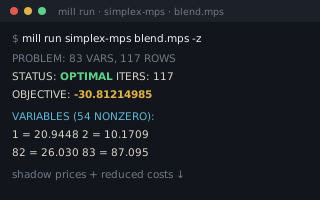 | simplex-from-mps | Reports how many entries a file's matrix stores against how many cells it would have taken. |
| Machine | Why | |
|---|---|---|
 | matrix | The dense
bridges: SpFromMat reads a Matrix and
SpToMat builds one. |
 | seq | All checks a
column's shape, Flatten gathers its entries, and
Pair holds them while they are being sorted into columns. |
 Shoddy · The Machines